Showing posts with label Social Media. Show all posts

Thursday, July 28, 2011

7 Reasons Why I Recommend Wordpress as a Website CMS for Small Business Owners

wordpress-logo-cristal_thumbnail-300x300

In a week I will launch my new website. Ever since I decided to switch websites (about a year ago) other Small Business owners have asked me: Sarah, I need a new website. What do you recommend ? First I thought I wasn’t qualified to answer, since I’m definitely not a web designer, but now, after building my own site (with some precious help), I will answer the following: if you want an easy to manage, cost effective, social media share-able website, I recommend you get a Wordpress.org site for your small business.

Let me share some reasons that brought me to this conclusion:

  1. WordPress is free

  2. WordPress is very commonly used. This means that you will find:
    • more design templates (Themes) – both free and paid– available for WordPress than for other systems
    • more extensions (called Plugins) which allow you to do almost anything (for example make posts share-able on Social Media, create contact forms, manage posts in multiple languages etc. etc. )
    • more information, help files and how-to videos

  3. WordPress is easy to use, even for non-technical users. This is probably the main reason why I recommend you get a Wordpress site. Because as a small business owner you might not want to pay your webmaster every time you have to update a page. Wordpress’ interface is simple and easy to use and you can update your site without any HTML knowledge.

  4. WordPress is a very powerful Content Management System (CMS).
    • Parent and Child Pages and Posts
    • Categories and Page Templates
    • Multiple Users and different User levels (Roles)
    • Advanced Menu editing system
    • WYSIWYG (What You See Is What You Get) Visual and HTML Editors
    • Plugins and Themes (templates)
    • XML import and export
    • multilingual website management through plugins

  5. Wordpress is Search Engine Optimization friendly. As a small business I am sure you are aware that your website is only valuable, if it gets enough traffic. In order to get traffic, it has to show up in search engines. “All in one SEO” is a great plugin for Wordpress which will help you optimize your website for your keywords and increase your chances to be found on Google and other engines.

  6. Google loves Wordpress. Since Wordpress sites are so easy to optimize, they are ranked highly on Google search results.

  7. Wordpress is evolving. Wordpress doesn’t stand still (compared to other CMS I’ve seen). It keeps evolving, programmers keep creating new features to keep up with trends in internet technology.

What is your opinion? Love it or hate it? Does your site run on Wordpress ? Please share in the comments below. Finally, if you would like to discuss a site project, contact me today, I’d be happy to answer your questions.

Friday, July 22, 2011

Are your blog posts sharable ?

blog

If you are part of the growing percentage of entrepreneurs who are writing regular blog posts – congratulations ! You are doing the right thing. Content is king, and a blog is the most important traffic source of any website.

But… (yes, there is a but) are your blog posts sharable on Social Media ?

It’s nice to write blog posts for your existing audience, but what is really cool about blog posts is the viral effect they can have. In order to ma

ke them viral though, you need to make sure that people will want to share them AND offer them easy ways to do so. For successful sharing I have put together a quick list of tips.

Content

  1. It starts with a title that grabs your reader’s attention
  2. It contains an image that’s related to the text
  3. It’s easy on the eye, several paragraphs, not one big clump of text
  4. It’s written in a language your audience understands, not full of acronyms and industry related terms
  5. It ends with a question are encouragement to leave a comment
  6. It may include a call to action such as a sign-up form for a free info product

Tools

  1. Automatically feed your blog posts to your Facebook page (for example via Networked Blogs)
  2. Automatically feed your blog posts to your Linkedin profile (via the Wordpress plugin on LinkedIn or Bloglink)
  3. Add social share icons to each of your blog posts or use Wordpress plugins such as Get Social
  4. Send a ping via pingomatic to different search engines that your blog has been updated

As I’m writing this post I realize that my own blog does not even fulfill all of the above criteria. Shame on me ! But wait, that’s why I'm getting rid of it :-) In 2 weeks I will announce my brand new website/blog. So check back here again soon.

What are you doing to make your posts shareable ?

A blog is one way to create traffic to your website. Want to learn about other ways ?
Download my free e-book called “21 Proven Ways to Improve Your Website Traffic”.
Just fill in your name and e-mail below:


Get your FREE e-book now
* indicates required


Friday, July 8, 2011

LinkedIn Company Pages

What are LinkedIn Company pages ?

According to LinkedIn, “Company Pages are a company’s profile of record on LinkedIn and a powerful way to speak to millions of professionals through word-of-mouth recommendations and trusted testimonials. It’s like a LinkedIn profile for a company.

For LinkedIn members, Company Pages are a great way to research companies you’re interested in, follow them to stay updated, see what kind of people work there, and even review the products and services you use.

For companies, Company Pages present an opportunity to reveal the human side of your company. Provide a peek at the individuals behind your brand and highlight how members use your products. Your Company Page offers tools to bring your brand to life.”

How do I set up a LinkedIn Company page ?

It’s pretty straight forward to set up your own company page. Just follow the tips and guidelines below and you will have your own in no time.

Start by clicking HERE to create your new page.

How do I customize my LinkedIn Company page ?

A Company page consists of 4 different tabs:

  • The Overview tab
  • The Products and Service tab
  • The Analytics tab
  • The Careers tab

Let’s have a look at them one by one.

  1. Overview tab
    In this tab you provide LinkedIn members with a rich, network-aware snapshot of your company.
    Company Name
    Make sure the company name listing matches the name you use in your profile. For example if you use LLC or Inc. on your personal profile, your company site must be the same.

    Admins
    LinkedIn wants to know who will administer your company profile. You have two choices: either all employees with a valid email address registered to your domain or designated users only.

    Logos
    Logos can be uploaded as a standard logo as well as a square logo that will be used for network updates.

    Company Description
    In the company description section, you have the opportunity to describe who you are and what you do.

    Specialties
    Include keywords that describe what you do in this section. You have 256 total characters to describe specialties.

    Twitter and Company Blog RSS Feed
    Reference your blogposts and Twitter feeds so you can provide a more comprehensive snapshot of your company to members

    Linkedin Company pages Twitter

    News Module
    Indicate whether you would like news about your company shared with visiting members

    Download LinkedIn’s Guide to set up your Overview tab

  2. Products and Services Tab

    In this tab you will showcase your best products and services and spotlight product recommendations.

    Edit default landing page
    First thing to do when optimizing this tab, is to edit your default landing page. Here you will provide content regarding your products and services to your default audience segment.

    Create additional audience segments
    You can create up to 4 different audience segments. When visiting members’ profiles indicate that they belong to a particular segment that you have defined, a customized version of your content will be served up. In the event that a member profile does not correspond to one of the audience segments that you’ve defined, content defined under your “default” tab will be served up.
    You can define your audience based on 4 criteria: Function, Industry, Seniority, and Geography.

    Linkedin Company pages Define Audience

    Listing all your products and services, describing them
    In this tab you will list all your products and services. You can upload pictures, link those to specific urls on your website and if you have one, even feature a short video, by inserting the youtube url. There is also a 2000 character space to describe each one of your products/services and a section where you can list the major benefits or features in bullet points.

    Download LinkedIn’s guide to set up your Products and Services tab

    Linkedin Company pages1

  3. Analytics Tab

    In this tab you can gain insights about company followers with data visible only to Company Page administrators

  4. Careers Tab

    In case your company is hiring, this is a great place to post your open job. You will get lots of visibility for very little money.

    Download LinkedIn’s guide to set up your Careers tab

So what do you think ? There is still space for improvement from LinkedIn’s side, but in my opinion if you have invested time to improve your profile, you should go all the way and also create a page for your company.

What are your thoughts ? Share below in the comment section…

Thursday, May 26, 2011

Get more website traffic with Flickr

by Sarah Santacroce

Poppies
Photo: courtesy of Veronique Goy


When I asked my list subscribers this Monday what they would like me to blog about, several people asked me to write an other post on how to increase their website traffic. So that’s just what I’m doing :-)

This time I take a closer look at Flickr, a photo and video sharing website which is owned by Yahoo. If you are a local business, especially one that sells products (handmade bags, homemade birthday cakes, designer clothes or whatever it might be) or even some services (manicure, relooking, photographs or any other service that has an end product that shows nicely on a picture) Flickr HAS to be part of your Social Media Marketing Strategy. It is highly indexed and will increase your search engine visibility and hence drive more traffic to your website.

It’s easy to start working with Flickr. Just go to Flickr.com and create an account. Remember to use your company name for branding purposes.

A couple of things to boost your visibility (Search Engine Optimization):
  • Titles: Use your keywords to create strong and descriptive titles for every picture. Think about unique ways to motivate users to click on your image.
  • Descriptions: write descriptions with the user in mind. Put yourself in their shoes and think what would make them click on your photo.
  • Hyperlinks: Add hyperlinks in your descriptions to relevant pages on your website
  • Local place names: If you are a local business that only sells locally (no online sales) make sure you use local search keywords for communities you are targeting (for example, Lausanne, Switzerland, Suisse Romande) in your titles, descriptions, tags, and hyperlinks.
  • Tags: Tag each photo with descriptive, searchable keywords. Include place names in the tags to attract local searches.
  • Profile: Search Engine Optimize your Flickr profile page and Flickr photo "sets" with search-friendly titles, tags, fun and informative descriptions, and links.
  • Flickr Groups: You can join relevant groups and post your photos there to get even more exposure.

Of course you will also want to use your Flickr photos and share them on other social sites such as Facebook, Twitter and Linkedin. Flickr makes social sharing very easy, all the buttons you need are right next to every picture.

Oh, did I mention that Flickr is totally FREE (unless you want to go Pro, then it’s $24.95 per year).

One last tip: If you are in the music, entertainment or art business, make sure you check out www.webdoc.com. It’s a very cool new tool for rich expressions. You can use pictures, videos, sounds, and apps to create your own mini-webpages for example for a concert, vernissage, exhibition etc. and share it all over your social network. Have a look and let me know what you think.

Friday, May 13, 2011

Vanity urls for Facebook and Linkedin profiles

by Sarah Santacroce

Al Pacino
“Vanity is my favourite sin.” Al Pacino

This short post is not really about vanity or even less about Al Pacino. It’s about personal branding and using vanity urls for your marketing. I want to show you how to get your personalized url for your Linkedin profile as well as your professional Facebook page.

But first, let’s quickly look at why it’s important:

So, let’s start with the vanity url for your Facebook page:

Before all things, you will have to get 25 “Likes” on your page. Facebook only allows “usernames”, as FB calls them, for pages with more then 25 people.

Once you have reached the magic number, you want to choose a username for your business.
Then you go to http://www.facebook.com/username/ and check if the name you have chosen is available for your page. If yes, congrats, if no, choose another one.

Your username for the vanity URL must be at least five characters long and be all alphanumeric characters (A-Z, 0-9).

A word of caution: Don't go for anything funny or cute. Play it straight. According to Facebook, "Once it's been selected, you won't be able to change or transfer it."

That’s all there is to it, really.

Facebook Vanity url

Now let’s have a look at your Linkedin Profile:

Select the “Edit Profile” tab, scroll down a bit and next to the “Public profile” link click on “Edit”.
On the new page, scroll down a wee bit and find the box that says “ Your public profile URL” (see picture below).

You then click on “Customize your public profile URL” and choose the name you like, preferably the same that you have chosen for your Facebook page.

Linkedin vanity url

If you would like to see if your username is available on all other Social Media sites, have a look at Namechk.com. It tells you at one Glance which names are available for which site.

namechk

Friday, April 8, 2011

Content Curation with Google Reader


by Sarah Santacroce

How do you stay informed ? How do you learn the latest news about your industry ?

If you are already know RSS feeds and how to aggregate them in to one single place to get your daily information boost then I suggest you skip the reading this time and go directly to the second video where Mari Smith gives you some more tips on content curation.

If you are new to RSS feeds and their aggregation, let me give me some more information on that subject.

What is a RSS feed ?

According to Wikipedia, RSS (most commonly expanded as Really Simple Syndication) is a family of web feed formats used to publish frequently updated works—such as blog entries, news headlines, audio, and video—in a standardized format.

Where do I find RSS feeds ?

Most websites or blogs with non-static, regularly updated content provide you with an RSS feed to get their content regularly. Just look for the orange RSS icon.
rss41

What can I do with these RSS feeds ?

RSS feeds are like news subscriptions. Every time your selected blog publishes a new post, it gets automatically sent to your feed reader.

What is a feed reader ?

According to Wikipedia, a feed reader is a is a Web-based aggregator, capable of reading Atom and RSS feeds online or offline.” In other words it is a web application which gathers web content such as news headlines, blogs, and podcasts in a single location for easy viewing.

How does Google Reader work ?

In this post I am going to focus on Google Reader, since that’s the tool I chose for mine and my client’s feed aggregation.

Google Reader

Google Reader let’s you organize all your feeds into one place. You can create different folders, just as in Windows Explorer. It looks a bit overwhelming at the beginning, since the more feeds you have, the more content you will receive. But the nice thing is that you don’t have to read it all. You can just look at the titles, decide if it’s interesting to you and if not, keep on scrolling…

Watch this short video if you want to learn how to add your rss subscriptions to your Google Reader:

Still, it’s a lot of content, who has time to read it all ?

As I mentioned before, you only read the items that seem of interest to you. I usually read mine early in the morning, and one more time after dinner. And if you are travelling a lot, I also recommend the Google mobile apps for your phone. Information on the go… There is also a “star function”, the possibility to mark articles for later with a little yellow star.

“I thought I had to create my own content, so why do I have to spend all this time reading other people’s stuff ?”

Content = knowledge. The more you read about your industry, the more you learn. And the more you learn, the more you can then teach others. In order to be seen as an expert in your industry, you will want to stay informed about the latest trends and tendencies. You might also remember the 20/80 percent rule in Social Media: for 20% of your own content, share at least 80% of other information (blog posts, videos, whitepapers etc.).

If you are not a big fan of Google’s products, watch this video where Mari Smith shows 7 other tools for content curation.

Now it’s your turn ? Which tool are you using ? Do you have questions about content aggregation? Post them in the comment section below.
Oh, and please subscribe to my RSS here :-)

Friday, March 25, 2011

Linkedin for B2B – part 2


by Sarah Santacroce

In part 1 of this post I showed you how to update your profile in order to get the full benefits of Linkedin. As promised, let’s now look at how you can use your fully optimized profile to network, share content and ultimately generate leads for your business.

Increase your reach – add new connections

Doing business on Linkedin is only worth it, if you actually have people in your network. So from now on, make it a habit to always add new people to your network. People you meet at a networking event, new contacts, former coworkers etc etc.

Share content

In order to showcase your expertise in your industry, take advantage of the options Linkedin offers to distribute content. Maybe you have a content aggregation tool (such as Google Reader) set up. Just pick relevant content that you think would interest your network and share it on Linkedin. I recommend 2 – 3 updates per week. The unspoken rule is 20/80. 20% of your content (blog posts, promotions etc) versus 80% of other informative content.
  1. Status updates

    Linkedin Status updates
    Similar to Facebook updates, you can share your content on Linkedin. You put a personalized message into the “Share an update” box, then click on the “Attach a link” and paste the link of the blog post or other url you want to share. Linkedin automatically pulls in the information and even creates a little thumbnail for you. If you have a Twitter account, you can click on the box next to the Twitter bird and your update will also be shared on Twitter.

  2. Group discussions

    Linkedin Group discussion
    You can also take part in group discussions by sharing relevant information directly within the groups.
    Each time someone replies or comments on your content, you will get notified by Linkedin.

  3. Bloglink application

    If you write a blog, I recommend you use the Bloglink application ! You can enter your RSS feed and it will then automatically display your latest blog post on your profile.

  4. Events application
    This is a must for every company who hosts offline or online events. Whenever you create a new event, it will not only be displayed on your networks’ newsfeed, but also be registered in the event directory where other people can see it.

Get your content shared

    LinkedIn Buttons

    Just like Facebook’s “Like” button and Twitter’s “Tweet” button, Linkedin has a “Share on Linkedin” button. If you have a professional blog, grab the code and paste it after every post in order to increase the sharing of your content. Click here to get the HTML code.

    Linkedin Share buttons

                  Network and get new leads with groups

                  1. Become a Member of an existing group
                    Do some research on the available groups and locate the ones that are most aligned with your company's products, services, experience and industry. And join them!

                  2. Participate actively in the group
                    Share your insight and experience in the ongoing discussions to benefit the community in an unselfish way. Be honest and trustworthy with your advice and conversation. Every now and then share your own content (blog posts, links to your website, white papers etc), always remembering the 20/80 % rule.

                  3. Create new relationships and take advantage of inbound marketing
                    Becoming an active member within LinkedIn Groups will naturally attract people to your side. By sharing your knowledge and expertise with your group members you will be successful in acquiring recognition for thought-leadership in your field. This will organically lead to increased inbound marketing, meaning more people searching for you, instead of you chasing after them.

                  4. Take advantage of InMail option with Groups
                    One of the best bonus features of Groups is that you can send InMail to group members without having to upgrade to a premium account. If you share a group with a person, you can send them a personal message (InMail) and ask them to connect or get in touch by phone or whatever else you wish.

                    I’ll give you an example of how this can be useful (I have actually done this for a client, so I know it works): you are registered at a big convention or some kind of offline event. Rather than just hope for some successful networking, prepare in advance and get access to the attendee list from the organizer. Once you have the names, spend some time on Linkedin and see who you share a group with. Now send them a friendly message, introducing yourself and inviting them to connect for a quick chat at the upcoming event. Social Media networking, followed-up by a real-life meeting :-)

                  5. Create your own group
                    If you don’t find an existing group that suits your needs you can also create your own group. You can directly communicate with your group members, send them weekly messages, feed in your blog and much more. Read this article on 10 reasons to start a Linkedin group from Lewis Howes.

                  Answer Questions

                  Linkedin Answers

                  Answering industry related questions is yet another option to show your expertise to the Linkedin Community. Each time you answer a question, your entire network will be notified on their newsfeed. Questions are organized into categories and each category has it’s own RSS feed. I recommend you subscribe to the categories which are relevant for your business and receive daily questions directly in your favorite feed reader (Google reader for example).

                  Referrals

                  How many new customers do you get by word of mouth referrals ? I bet it’s quite a big number.
                  Every time you get a new referral it will show up on your whole network’s news feed ! For more information about referrals read this post by Jeanne Hopkins: 3 Strategies to get more sales referrals with Linkedin.

                  Linkedin DirectAds

                  Last but not least there are Linkedin’s version of Paid Per Click Ads. Linkedin Direct Ads allow you to target ads by industry, company, geography, job function, seniority, gender and age. Ads can appear as a media box, banner ad or text hyperlink. They are pay-per-click or by impressions and can be stopped at any time.

                  I like them better than Google Ads because they can be very targeted. You can even target just members of a specific group for example.

                  Linkedin DirectAd

                  New feature: Leads

                  linkedinads_leads
                  Just this week I received an e-mail from Linkedin, inviting me to test a new feature on Linkedin DirectAds.
                  Here’s how it works:

                  1. LinkedIn members who click on your campaign will be shown your ad's landing page with a single-click option to be contacted (see picture above).
                  2. The profiles of members who choose to be contacted will be shown in your account under the Leads tab.
                  3. You will be able to send a free follow-up message to them on LinkedIn.

                  I think this is a great new feature and I will definitely give it a try ! Remember: they are beta testing this, so it might not be available on every account just yet.

                  So, now it’s your turn ! How do you use Linkedin? Do you have any additional tips and tricks? Please share them in the comments below. Oh, and you find me on Linkedin under: http://www.linkedin.com/in/simplicityadmins

                  P.S. LinkedIn reached a 100 Million users this Tuesday!!

                  P.P.S. If you would like to receive this 2-post series about Linkedin for B2B in an easy printable format, just click here, enter your name and e-mail and I will send you the pdf file.


                  Friday, March 18, 2011

                  Linkedin for B2B – part 1

                  by Sarah Santacroce

                  When people talk about Social Media, they usually mention the BIG 3. Linkedin, besides Facebook and Twitter is part of those 3. With it’s over 90 Million registered users I think it deserves it’s ranking.

                  In this 2 post series about Linkedin for B2B I will show you how you can implement Linkedin in your overall marketing strategy, increasing brand awareness and augment leads in general. The first post will explain how to optimize your profile and promote it effectively, the second post will focus on content distribution and networking options that are possible with Linkedin Groups.

                  So let’s get started.

                  Treat your profile like you treat your website
                  What do you usually do when you inquire about a new business partner, supplier or customer ? You Google their name, correct ? If this person has a Linkedin profile, it will ALWAYS show up on the first page of the Google search results. Your profile will be the first thing people see, so make sure you make a good first impression.

                  1. Create a relevant and distinctive tagline for your profile
                    This is the title that shows on the very top of your profile, next to your picture. It is important because it defines you. Make sure it contains some of your keywords as it is indexed in Linkedin’s search engine. CFO or VP is not distinctive enough.

                  2. Upload a professional photo
                    LinkedIn, after all, is a social networking channel. So add as many personal touches as possible to maximize engagement and put a face to the brand. Remember, it is not Facebook, so no pictures with funny hats, your pet or your kids in the background.

                  3. Create link love to your websites
                    In the “websites” section you can include relevant URLs in your profile, and use links with anchor text. For example, instead of “My Website,” use a keyword to describe it such as “Small Business Mktg Solutions.” (see image).

                    Linkedin link love

                    You can also link to your product or service brochure for example. Just click on “Edit”, then on the dropdown menu choose “Other”. You can then define your own text and simply paste the url to your brochure or any other landing page of your website.

                    Edit links

                  4. Develop your 30 second elevator speech in your Profile Summary
                    What do you say when someone asks you “So what do you do?” at a networking event. The answer goes in the Profile Summary. Nicely packaged and easily digestible :-) I broke mine into different paragraphs so it’s easier on the eye.

                  5. Showcase your best skills and ignite the SEO potency of your Profile using the “specialties” section
                    Very important section again, because these skills are indexed in Linkedin’s search engine.

                  6. Customize profile url
                    Customize url
                    Make sure you create a vanity url for your public profile by clicking on the “Edit” button and giving it the name you wish. It will be much easier to remember and share than the long string of numbers that Linkedin gives you by default.
                  7. Leverage Third-Party Applications
                    Last but not least you can add applications to your profile. My favorite three are the following:
                  • Bloglink: automatically display your latest blog posts
                  • Boxnet: Add links to files like resumes and marketing kits
                  • Slideshare: Share business presentations and demos with your network

                  I will talk about these apps more in part 2 when I we get into the content distribution.

                  Promote Your Profile
                  In order to expand your network, LinkedIn marketing efforts – like anything else – must be promoted in other channels. Include a link to your profile on your website and blog, in individual blog posts, in email signatures, on your brochures and even on business cards.

                  So now that you have updated your profile, you are ready to add new connections, share content, join groups and take full advantage of all the possibilities that Linkedin has to offer. I will talk about them in my next post, so subscribe to my RSS feed or come back next week :-)

                  Btw, you can find me on Linkedin under http://www.linkedin.com/in/simplicityadmins

                  Monday, February 21, 2011

                  International Women's Day activity

                  by Sarah Santacroce


                  Update: I changed the activity because of Facebook's promotion rules. Please no longer post your links on my wall, but directly here in the comments of this post. The winner will be announced here too (previous participants will obviously still take part in the drawing). Thank you for your understanding - Sarah

                  International Women's Day 100 years

                  In order to celebrate the international women’s day on March 8th and mark the economic, political and social achievements of women, I encourage you to participate in the following activity:

                  • starting today (Feb 21st) and until March 8th 2011, if you are a women entrepreneur, a mompreneur or run a mainly women owned business, feature your business in the comments below . You can include a short description and a link to your Facebook page or website
                  • on March 9th, I will draw one lucky winner (with random.org) who will receive a Linkedin Profile Makeover which will help you drive more traffic to your website and increase your future sales.

                  So, don’t be shy ! Come on over to my wall and promote your business ! Women power !

                  Check out the IWD 2011 website for events in your region. P.S. Did you know that in China, Russia, Vietnam and Bulgaria International women’s day is a national holiday ?

                  P.S. To my male readers: I hope you won’t be mad that you are not included in the game this round. I’ll make sure to think of something else where boys get to play too :-)

                  Saturday, January 22, 2011

                  Facebook pages for small businesses

                  by Sarah Santacroce

                  If you haven’t been living under a rock, you have probably heard that everybody is talking about Social Media. Especially Facebook. So what is all the buzz about ? And how is it relevant to you, small business owner ?

                  Being myself the owner of a small business, let me give some insight about these famous Facebook pages and how I think they can benefit your business.

                  Why a Facebook Business Page ?

                  A ) It’s free
                  And not many things are, so why not take advantage of it ?

                  B) Huge audience
                  Facebook is expanding day by day. Here are some statistics from their website:

                  *Due to hit 600 million subscribers end of 2010

                  *More than 250 million active users, half of them log on at least once each day

                  *More than two-thirds of Facebook users are outside of university

                  *The fastest growing demographic are individuals 35 years old and older

                  *More than 8 million users become fans of pages daily

                  *70 percent of Facebook users are outside the United States

                  C) Optimized Search Results
                  Google and other search engines find and list your page. Even better is when you have more than 25 fans, you are allowed to customize the web address of your page. Instead of Facebook.com/and a long string of numbers and letters you can have www.facebook.com/yourcompanyname

                  D) Increased traffic to your website
                  On your Facebook page you will promote your website, post your blog posts and showcase your testimonials. This will automatically increase the traffic to your website and…

                  E) increase your sales
                  If you utilize your page the right way, you will increase your sales. This will not happen over night, since you will first have to establish a partnership and gain the trust of your fans. But in the long run, if they happen to need the services/products you offer, they will know you as the expert and come to you in the first place.

                  How can I measure my return on investment ?

                  True thing, Facebook does take quite some time to maintain. If you want your fans to interact and socialize on your page, you need to deliver daily updates, quotes, videos, articles, interesting facts etc. But will this time you invest be worth it in the end ? Below are two tools which help you to find answers to that question.

                  1. Facebook stats

                  Facebook stats
                  Facebook will send you a weekly update with your Facebook statistics. In it you can see how many active users you have, how many weekly visits and how many additional “likes” you got that week. This basically shows you how popular your page is and let’s you adapt the style of your updates.

                  2. Google analytics

                  google analytics
                  In your Google Analytics account you will find valid information on how many people come from Facebook to visit your website. In order to measure if they actually buy your product, you will have to set up a goal with your analytics account.

                  When preparing for this post, I asked the people in my network what they would like to know with regards to this subject. Here are a couple of questions I got:

                  Questions:

                  1. If I have a Facebook page, do I still need a website ?
                  2. I already have a Facebook personal profile, can I use that for my business ?
                  3. Is there a way that my clients can order directly through the Facebook page ?
                  4. I don’t know what to post on my page, can you give me some ideas ?

                  Answers:

                  1. In my opinion it’s still better to have a website. The site is where your clients find all the information about your business, your services and products. Facebook is just a door opener for your page, a way to bring clients to your website. However, if you feel confident that your main target public hangs out only on Facebook, you could probably get away with just the Facebook page. See also my response to Question 3 concerning a store front directly on your FB page.

                  2. I advise against using your personal profile for business purposes. The personal profile is to connect with your friends, share photos and experiences. But I would keep that separate from your business page. That doesn’t mean that you cannot share some personal info on the business page, but you will be more selective on what you share.

                  3. Someone asked me if there is a way to have a “store front” directly on your page, where clients can order and pay for your products and services, without ever leaving Facebook. Yes, there is. I have never actually used it myself, but I recommend you check out the Payvment application. Read this review for more information.

                  4. There are many things you can post on your wall. Here are some examples:

                    - pictures of your products
                    - pictures of your store front
                    - quotes
                    - interesting facts
                    - links to your blog posts
                    - polls
                    - videos that you find interesting and relevant
                    - questions and answers
                    - discounts
                    - etc. etc.

                    Don’t forget that there are also many applications you can use to enhance the engagement on your page. Read this post on Social @ Blogging Tracker on how to increase engagement through applications.


                  If you have other questions, please leave me a comment below and I’ll be happy to answer. You can also e-mail me at sarah@simplicityadmins.com

                  I hope I supplied some valuable info on the benefits of a Facebook page.
                  I am not saying that every small business has to have a Facebook page. It does help in terms of the Search Engine Optimization, but it all depends on your target clientele. If your target public are other businesses, you might want to invest more time on Linkedin.

                  I’d be honored if you joined the discussion on my own page at http://www.facebook.com/Simplicityadmins. I’m looking forward to connecting with you !

                  Tuesday, October 12, 2010

                  How do I get found on Google?

                  by Sarah Santacroce

                  …that was the question somebody asked me at a networking event last Thursday. Hmm, I had prepared my Elevator Pitch, but wasn’t quite ready to answer this complex question in 30 seconds ! Instead I said: “I can help you, give me a call and we’ll discuss it”. In order to prepare for that call, I thought I’d write a blog post and share it with my readers.

                  As most of you know, I’m not a professional Search Engine Optimizer, but I can share my tips and tricks with you, and I know that they work. Just Google “bilingual Virtual Assistant Switzerland” and have a look at the results.

                  So let’s start with first things first:

                  Submit your website and company info to website and local directories

                  It’s not the most interesting task, but there is no way around it. You will have to spend some time (or money if you have it outsourced) and submit your website to major website directories. The main one is the dmoz directory, which is free. Then there are thousands of other ones, some free some not, some general some industry specific. You can find them all here. All submissions take at least 4 weeks until they are confirmed. So you need an extra dose of patience …

                  I also recommend you submit your company info to local directories such as Google Places, Yelp, Yellow Pages etc, especially if you are a brick and mortar business. Research which ones are the most relevant in your area and submit your company info.

                  Good online content

                  content

                  Content is king ! The Search Engine spiders are hunting and crawling through your pages in search of good content. So if you want to make the first page of Google, you will have to supply good online content. There are many ways how to do that:

                  Write regular blog posts

                  In blog posts you can share your expertise about your industry and create trust towards your company. Blog posts are very well indexed on Google and if the blog is hosted on your website, they create big traffic to your site. If on the other hand you are using a hosted blog version (such as blogspot.com) there’s less direct traffic to your site but it does present an advantage from the link building point of view.

                  Write a monthly press release and distribute it online

                  Today press or news releases can be used even by small companies, and the whole wide world has access to them. By distributing your press releases online (for example on pitchengine.com) you will be reaching out to a huge audience and therefore increase your website traffic (and hopefully your sales!). Don’t forget to create a “Media Room” on your website and also post your releases there. The spiders love new content on your website !

                  Submit articles on article submission sites

                  Another great (and free) resource to increase traffic to your website is via article marketing. You write compelling, informative articles (or repurpose previously written texts) and post them on article marketing publisher’s sites (such as ezinarticles.com). They get free content that can be employed by others looking for great information to post on their websites. Every article contains a so called “author resource box” where you post a short bio and a link to your website or a free e-book.

                  Scribd, Slideshare and Posterous

                  You can upload your content in pretty much any format: PDF, Word or Powerpoint and share it with the world’s largest community of readers. Those sites are ranked highly in Google searches.


                  Social Media

                  social-media

                  The use of Social Media is also recommended to complete your online presence and increase your chances to figure on the 1st page of Google’s search results. Social Media content is instant and it’s everywhere. If somebody “googles” your name to find out more about you, he/she should find at least those 5 links with your name: the “about” page on your website, your Facebook Page, your Twitter profile, your Linkedin profile (and/or Xing and Viadeo) and your Google profile. So how many of those do you already have ?


                  Keyword optimization and SEO
                  SEO

                  As I mentioned before, I’m not an SEO specialist. What I do know though is how to target specific keywords and implement them on your website and throughout all your internet marketing strategy. So before you start with the SEO, take some time to brainstorm and come up with at least 3 very specific, very targeted keywords or key phrases. Once you have done that, move on to the SEO:

                  Use unique title tags (containing your keywords) for each page

                  When you look at your website in a browser, you’ll find the title tag on the top left hand side of the screen. Each page should have a unique title tag that tells the search engines what that page is about.

                  Create a unique meta description for each page

                  The search engines index the meta descriptions to learn what your page is about and some will display your description in the search engine results. The meta description should not be more than 150 characters.

                  Use Alt text for images and integrate your keywords in the image file name

                  When inserting images into your website, make sure you use your keywords in the Alt text attribute and in the image file name. Example: if I upload a portrait of myself I would name the file:”Sarah Santacroce, bilingual Virtual Assistant” and put the same text in the Alt attribute.


                  That’s all, folks. I hope you have found value in these tips. Don’t forget to leave a comment (they also increase your online visibility !)

                  I have also created a free e-book called “21 Proven Ways to Increase Your Website Traffic”. You will find the above and more information in a handy pdf format. Get it here !
                  Or just subscribe to my RSS Feed to receive all my blog posts directly in your preferred feed aggregator.

                  Thursday, August 12, 2010

                  How to manage a multilingual Facebook page

                  by Sarah Santacroce

                  Even though English is usually the common language for international business people, most non native English speakers still prefer to read their daily information and communication in their mother tongue. The same goes for Facebook. And according to Facebook, 70% of their users are outside the United States. Once a user sets his/her preferred language, he/she will see most of Facebooks site in that language.

                  Which are the two main reasons to have a multilingual Facebook page ?

                  1. You live in a country where there is a big majority of people who speak an other language (in America 10.7 % speak Spanish, in Switzerland 63.7% speak French, 20.4% speak French and 6.5% speak Italian, in Canada 21.6% speak French etc. )
                  2. You do business internationally and your target audience is multilingual

                  If either one of those reasons applies to you, you might want to start managing your Facebook page in multiple languages. You will see that you will get much more return (comments, likes, interactions) from people, if they get to read your content in their own native language. You could even go a step further and personalize the content with country specific information. For example: in the USA a majority of people uses Linkedin, in France Viadeo is more popular and in Germany it is Xing. So if you post an update about this Social Media tool, you would post Linkedin for the Americans, Viadeo for the French and Xing for the German speaking members. For more details on localization you might find this post about website localization and multilingual SEO interesting.

                  So now that I have convinced you that a multilingual Facebook page is the way to go, I’ll show you quickly how easy it really is to do:

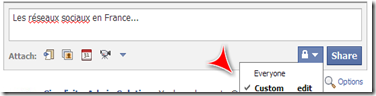
                  1. Go to your Facebook page, write a status update and click on the custom button

                  Multilingual Facebook page

                  2. Define your audience by choosing the location and the languages

                  Multilingual Facebook page

                  3. Share your update and recognize the customized posts by the little “custom” icon

                  Multilingual Facebook page

                  That’s it, that’s all there is to it. Of course you have to be fluent in the other language, since grammatical mistakes are not very sexy :-) If you’re not, hire a bilingual Virtual Assistant to help you !

                  If you found this post helpful, consider joining a growing international community on my Facebook page (and let me know by posting a message in your mother tongue on my wall) or signing up for more helpful small business tips by subscribing to my RSS Feed. Thanks for reading!

                  Thursday, July 1, 2010

                  How to use your e-mail signature as a Marketing tool

                  by Guest Blogger Michelle Mangen

                  Wanting to have a fancy email signature for your Gmail, Yahoo!, Hotmail or AOL email accounts?

                  Come on – you know you want it! Up until now it’s never really been that easy to add an HTML signature to your Gmail account.

                  Several weeks ago I did a post on How To Add A Twitter Icon to your email signature for Outlook 2007. Since I wrote that post I came across “WiseStamp” which allows you to create the same type of signature for some of the free email services.

                  e-mail signature as Marketing tool

                  The steps on how to do this were quite easy and I was really pleased with the result.

                  and then….I realized that it wouldn’t work with Outlook and I don’t want to actually log in to Gmail in order to have my kickin’ new social media icon laden email signature.

                  So I figured out how to have the best of both worlds. For the ones of you that use the web-based email programs for Gmail, Yahoo! Mail, Hotmail and AOL email you will only have to set up Wisestamp and in a few minutes you will be ready to blast off emails to everyone and their mom showing off your rockin’ new signature.

                  For the ones of us that still use Outlook you will have a few more steps but in the end, trust me, it will all be worth it.

                  Do you use the web-based email programs? If so, hop to the end and leave a comment.

                  If you use Outlook 2007 use these steps to add your Twitter, your Facebook, LinkedIn, YouTube, Skype, etc. icons into your email signature.
                  1. Set up WiseStamp (they have directions so I won’t bore you with them)
                  2. Sign into your web-based program and send yourself a blank message
                  3. Log into your Outlook and open the message you just sent yourself
                  4. Right Click in the body of the email and chose “view source”
                  5. This will bring up a text document with all of the HTML of the email signature
                  6. Copy that into a free HTML editor (I use PageBreeze)
                  7. View the new “page” in “normal mode” (PageBreeze instructions)
                  8. Copy the “normal” looking page
                  9. Open your signature box and create a new signature (see my previous post for instructions on how to do edit your Outlook signature)
                  10. Go test it….are you now sporting a rockin’ new signature?

                  Michelle Mangen, Your Virtual Assistant, specializes in Social Media and Bookkeeping and will work with you to take your business to the next level. Find her on Twitter @mmangen

                  Friday, June 18, 2010

                  Understanding Yahoo!’s recent update changes

                  by Sarah Santacroce

                  A friend of mine recently kindly informed me that her Yahoo e-mail homepage was getting swamped with my updates. She didn’t exactly know where all these updates were coming from and neither did I, because I was sure I didn’t send her any e-mails. So I decided to investigate. Here is what I found out:

                  A couple of weeks ago, Yahoo expanded their “Updates” section and now also acts as a Social Media aggregator. What does that mean? It means that when you login to your Yahoo homepage, you now see your “friends” Yahoo status updates as well as updates on third party services (such as Facebook, Twitter, Flickr, Stumble Upon etc.) that they have added to their Yahoo profile. Before, both parties had to “agree to be friends”, but in the new version the mutual follow is no longer a requirement.

                  So, to get back to my story: my friend received an update for each single tweet (and I tweet a lot!), each status update on Facebook and every blog post I published! Obviously she was slightly bothered by my invasion of her Yahoo account! And I’m so glad she told me so I could solve this issue! In order to avoid this situation for you, I decided to write this blog post and show you in 3 simple steps what to do:

                  Step 1 – Update your profile
                  While you’re at it, you might as well update your profile. Go to http://pulse.yahoo.com/, click on Profile and hit “Edit”

                  Step 2 – Manage your Settings
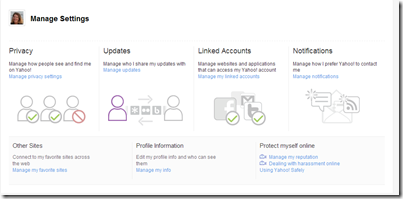
                  Go to http://pulse.yahoo.com/y/settings and you’ll find the following screen. From there you can update your Privacy settings, your Updates, your linked Accounts and your Notifications.

                  Yahoo Manage Settings

                  Step 3 – Manage your Updates
                  If you click on “Updates” you’ll see the following screen:

                  Yahoo Manage Updates

                  On this screen you will have to choose, which updates you want to share with your friends. If you are on Twitter, I recommend you don’t share your tweets, because you will end up swamping your friends’ homepage like I did. I decided to share my Blog posts, my Stumble Upon bookmarks and my Yahoo status updates. Up to you, which notifications you want to share…

                  I hope you found this post useful. Let me know your thoughts on Yahoo’s update changes…

                  I post other useful tips on my Facebook page. Why not join me ?

                  Friday, December 4, 2009

                  Learning about Social Media

                  About a month ago I attended a HOSB (Hands on Small Business) course here in Orange County. The course was free and Tracey Clark, the speaker, informed us about many things: how to build a free website with Microsoft, what stands behind Kirtsy and what all the buzz is about Social Media. The latter was my favorite. Until then I had used Facebook only for personal matters and I had signed up for a Twitter account, but had never used it before. So when Tracey showed us all her tricks, it definitely captured my attention. So now, about 4 weeks later I am still in the learning process, but I have now set up my Fanpage on Facebook and even posted my first 20 or so tweets. John Jantsch, from Ducttape Marketing has a written a great guide about how to use Social Media for your business. Find it here if you want to learn more.